TricksWorld 99: facebook tricks

Tab

Best 4 Facebook Pranks of 2013 [Pranks Of the Year]


Best 4 Facebook Pranks of 2013 [Pranks Of the Year]

Hello Friends,
In this am going Post to teach 4 Best Facebook pranks of 2013 which is going to be really awesome.You can enjoy alot by pranking your friends with this Best tricks.This pranks are just for fun please dont use them illegally or try to take your revenge on anyone.
There are thousands of pranks on facebook but i chose this 4 pranks because these are the best forever.
I will also keep updating you people with other pranks soon. So subscribe here soon!!!


Prank 1 : A Ghost Profile Prank


Best 4 Facebook Pranks of 2013 [Pranks Of the Year]
This is one of the Best facebook prank till now.If you want to scare your friends then tell them to visit this profile link and to click on the photos as shown in the screen shot and wait for for few seconds.There will be a terrifying Ghost image on there screen with a loud sound. Most of you would have seen this kind of trick in videos but this is something different.Please be careful dont send this link to weak hearted person.This Prank best works on girls.

               Click Here For The Ghost Profile Link


Prank 2:  Create A Fake Wall Post For your Facebook Profile
Best 4 Facebook Pranks of 2013 [Pranks Of the Year]

Best 4 Facebook Pranks of 2013 [Pranks Of the Year]Just Visit the website in the link given below.Here this website is called as wall machine where you can create your own wall post with some Celebrity name or some other persons name and even upload your own images as shown in screen shot.After creating your wall post save it and post it on your facebook wall and then some of your noob friends will be amazed to see it and get pranked.
                         Click Here To Visit


Prank 3 : Fake News Generator


Best 4 Facebook Pranks of 2013 [Pranks Of the Year]
 
 This Prank is really awesome. All you need to do is vist the website given in the link and choose the news in the list and type your friends name and his facebook id. The application will create a fake news as per the topic choosen with your friend highlighted in it. Similar to the above screen shot.

                            Click Here To Visit

Prank 4: Find Your Friends Crush Using Fake Love Calculator


Best 4 Facebook Pranks of 2013 [Pranks Of the Year]
Just visit Crush bits  website and sign up for a free account. This website will provide you a link. All you need to do is just put your status similar to this.

"This is accurate love calculating app which i have never seen in my life " (along with your link)
Please wait for few minutes. Now the trick starts :) . After posting this link your friends will start seeing your status and most of your friends will enter their crush names and will get trapped. You will receive an email whenever your friends enter the details in this link as shown in the screen shot.
With this awesome prank I just came to know many of my friends crushes.

                          Click Here To Visit


 Also Read:
Enhanced by Zemanta

How To Reveal Hidden Passwords (Asterisks/Bullets) In Web Browsers

How To Reveal Hidden Passwords (Asterisks/Bullets) In Web Browsers

Hello Friends,
This trick is something special,you could have noticed in some cases people have tendency to hit/tick the Remember Me option to save there login passwords so that it will be easy to access the account. 
And even sometimes we forget the password after a while. This trick will help you retrieve the passwords behind the cover of Asterisks/Bullets.

Even if you find that some person has hit the remember me option in any PC its easy to find his password with this simple trick.

How To HACK Facebook/Twitter/ Any Account Password????

Some of You may see the below simple trick and ask me Rudely the above question.           But the answer is No. Dont blindly waste your time searching in internet about this question. Even if you find a trick to Hack a account. It wont Work.

Now we will stop discussing about the off - topic. 
Simply Follow the below steps to reveal the password behind the Bullets/astericks:   

=>In Google Chrome                                    

       1. Open the google chrome browser.
       2. Type your username and password in any of the social networking site/ Mail sites.
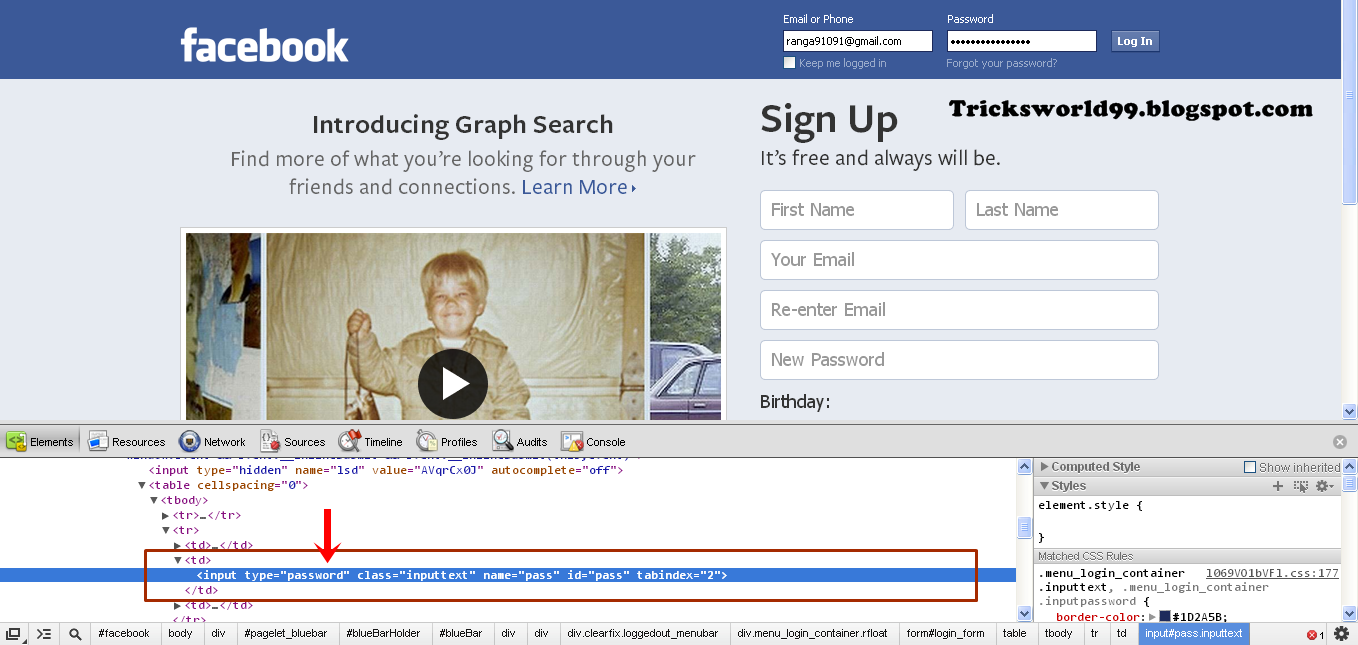
       3. Right click on the password box and click on Inspect Element as shown below.

         
          4.You will find a window in your browser as shown below.

How To Reveal Hidden Passwords (Asterisks/Bullets) In Web Browsers         


          5.Search for < input type="password" in the highlighted area.
          6.Double click on the type="password" and now type text in that place and press
              enter.

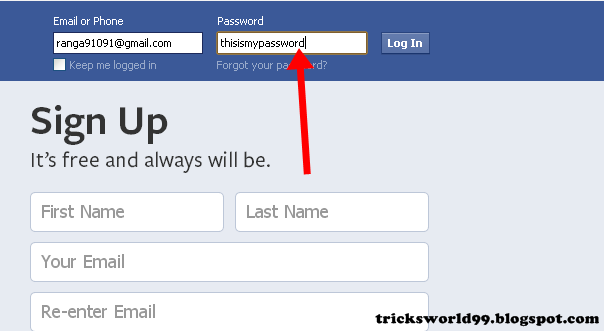
           7. It will something like this as shown in below screen shot.


How To Reveal Hidden Passwords (Asterisks/Bullets) In Web Browsers

     8.As soon as you press enter your password will be revealed.                                                                                                               
 How To Reveal Hidden Passwords (Asterisks/Bullets) In Web Browsers


=>Mozilla Firefox                                                      
  
    1.Open the Mozilla Firefox browser.
       2. Type your username and password in any of the social networking site/ Mail sites.
       3. Right click on the password box and click on Inspect Element(Q) as shown below.


How To Reveal Hidden Passwords (Asterisks/Bullets) In Web Browsers
     

       4.You will find the below kind of window in your browser.
       5. Click on the markup panel(Alt+M) as shown below.


How To Reveal Hidden Passwords (Asterisks/Bullets) In Web Browsers
     

       6. As soon as you click the markup panel you need to perform as follows
        7.Search for type="password" in the highlighted area.
        8.Double click on the type="password" and now type text in that place and  press    
              enter.
         9. It will something like this as shown in below screen shot.

How To Reveal Hidden Passwords (Asterisks/Bullets) In Web Browsers
      10.As soon you hit enter your password will be revealed.


How To Reveal Hidden Passwords (Asterisks/Bullets) In Web Browsers


                     Thats it Enjoy :)

Also Read:

Enhanced by Zemanta

How to move Photos/Albums From Facebook To Google Plus


How to move Photos/Albums From Facebook To Google Plus
Hello Friends,
Facebook which is the best social networking site and is the 2nd website in world.Recently Google Plus joined the race.
But the Tricks Here is some of you need to share your facebook albums/photos in google plus.
So it can be done easily and one more thing in this trick is that you can even upload your tagged photos to google plus. 

=>Yes, moveyourphotos.com helps you in downloading your photos from any Facebook album you can view it (what am trying to tell is you can even download others album)

Steps to be followed to move your photos from Facebook to Google Plus:

  • Visit the moveyourphotos.com and just download and install the addon (Its available for Both Google Chrome and Firefox)
  •  Now just Navigate to a facebook photo album which you need to transfer to your Google Plus account
  •     Enter a name for the album in the text box on your brand new spanking photoimporter toolbar.
  •   Now Click the  "make album"
  •    Now you may repeat the above 3 steps with as many different facebook albums you want.
  •   When you have recorded the information of all the albums you wish to import to google Plus, click "submit all albums"
  •     You will be brought back to moveyouralbums.com and given a link to login to your google account
  •     As soon as  you have logged in to google account it will begin the processing of your photos, upon completion it will give you a link to your new albums on google
 Also Read:

Enhanced by Zemanta

Happy New Year Chat Codes For Facebook


Happy New Year Chat Codes For Facebook

A Very Happy New Year To Everyone In Advance
Hmmmm we all convey our new year wishes to each other by SMS,Calls,Updating our Facebook status and 
other through other Social networking Sites But Let it Be Something Different Like Shown below: 

Happy New Year Chat Codes For Facebook


I have Listed The Codes Here Copy The Entire Code And Paste In The Chat Box and Press Enter

Code 1:

[[348187205287633]] [[348187198620967]] [[348187208620966]] [[348187201954300]] [[348187211954299]] [[348187288620958]] 
[[348187298620957]] [[348187291954291]] [[348187285287625]] [[348187295287624]] [[348187425287611]] [[348187441954276]] 
[[348187448620942]] [[348187428620944]] [[348187458620941]] [[348187685287585]] [[348187671954253]] [[348187695287584]] 
[[348187675287586]] [[348187668620920]] [[348187938620893]] [[348187941954226]] [[348187935287560]] [[348187931954227]] 
[[348187928620894]] [[348188201954200]] [[348188195287534]] [[348188198620867]] [[348188211954199]] [[348188208620866]] 


 Code 2:
 [[348175178622169]] [[348175175288836]] [[348175171955503]] [[348175168622170]] [[348175165288837]] [[348175275288826]]
[[348175268622160]] [[348175261955494]] [[348175271955493]] [[348175265288827]] [[348175381955482]] [[348175371955483]]
[[348175375288816]] [[348175378622149]] [[348175368622150]] [[348175475288806]] [[348175465288807]] [[348175471955473]]
[[348175468622140]] [[348175478622139]] [[348175551955465]] [[348175555288798]] [[348175561955464]] [[348175548622132]]
[[348175558622131]] [[348175648622122]] [[348175651955455]] [[348175655288788]] [[348175641955456]] [[348175645288789]] 


Code 3:
[[322188301217545]] [[322188304550878]] [[322188311217544]] [[322188307884211]] [[322188314550877]] [[322188531217522]] 
[[322188537884188]] [[322188527884189]] [[322188521217523]] [[322188524550856]] [[322188697884172]] [[322188704550838]] 
[[322188691217506]] [[322188694550839]] [[322188701217505]] [[322188861217489]] [[322188871217488]] [[322188867884155]] 
[[322188857884156]] [[322188864550822]] [[322188954550813]] [[322188951217480]] [[322188947884147]] [[322188944550814]] 


Code 4:  
[[228981703905666]] [[228981707238999]] [[228981710572332]] [[228981713905665]] [[228981700572333]] [[228981783905658]] 
[[228981787238991]] [[228981780572325]] [[228981790572324]] [[228981793905657]] [[228981890572314]] [[228981893905647]] 
[[228981883905648]] [[228981887238981]] [[228981897238980]] [[228981973905639]] [[228981983905638]] [[228981977238972]] 
[[228981980572305]] [[228981987238971]] [[228982070572296]] [[228982080572295]] [[228982073905629]] [[228982083905628]] 
[[228982077238962]] [[228982170572286]] [[228982167238953]] [[228982173905619]] [[228982160572287]] [[228982163905620]] 


Code 5:
[[228970833906753]] [[228970830573420]] [[228970820573421]] [[228970827240087]] [[228970953906741]] [[228970967240073]] 
[[228970963906740]] [[228970957240074]] [[228970960573407]] [[228971053906731]] [[228971057240064]] [[228971047240065]] 
[[228971043906732]] [[228971050573398]] [[228971143906722]] [[228971153906721]] [[228971150573388]] [[228971147240055]] 
[[228971140573389]] [[228971260573377]] [[228971250573378]] [[228971253906711]] [[228971257240044]] [[228971263906710]] 


How To Change The Background Of Facebook Login Page

Everyone bored of the same old facebook login page???
dont worry here am posting a new facebook trick where you can change your login page background with simple steps and with your favourite images. 


How To Change The Background Of Facebook Login Page

                                                                                                                                 
Note: This Trick is for only GOOGLE CHROME browser :( :( 

  •  Open this link in your google chrome browser    Click Here 
  • Install this Extension
  • If you have logged in into your fb account please logout.
  • Open Facebook website now
  • Yes now you see a different login page with some background which you may not like :D :D. You can change the background image with any image  you want by clicking the Setting icon above the Log In button. I have marked it in the above snapshot.
How To Change The Background Of Facebook Login Page

How To Increase Likes for Facebook Page?[Free Facebook likes]


LikeUb lets you earn up to 25% of the Likes generated by new members you recruit!
Every member who signs in with your link becomes your referral and gets you Likes on LikeUb. To get referrals, introduce LikeUb to your friends, share your referral link on your Facebook page, talk about it on your favorite forum, blog or on your website!


Fans Facebook
How it works
LikeUb will help you get more Likes for your Facebook page.
This new concept is based on reciprocity. To earn Likes for your page, you just have to Like other members’ pages.
Step 1
Add your Facebook page to the tab My Pages.
LikeUb will approve your page straightaway!
Step 2
Click on Open the Viewer to start earning your Likes.
Click on Like if you like the page displayed.

Multiply your Likes with referrals!
With LikeUb, the most effective way to earn Likes for free is with referrals!
Tell your friends and family about LikeUb, put ads on your Facebook page, and earn up to 25% of the Likes generated by the people you refer

For example
If you recruit 20 members and they each earn 15 Likes a day:
  • In 1 week : 20 members x 15 Likes x 7 days x 20% = 420 Likes
  • In 1 month : 20 members x 15 Likes x 30 days x 20% = 1 800 Likes
  • In 3 months : 20 members x 15 Likes x 90 days x 20% = 5 400 Likes


Picture Codes For Facebook Chat


Do You Like These Faces and You Want to Use it in Your Facebook Here's The Codes You Entered in Chat Box and The Face Will Appear to The One You Chat With. Here's The Codes For  Faces Use It and You Will Be Unique Among Your Friends.


Troll Face

[[242538225822042]] [[242538222488709]] [[242538232488708]] [[242538219155376]] [[242538229155375]] [[242538339155364]]
[[242538335822031]] [[242538342488697]] [[242538345822030]] [[242538349155363]] [[242538392488692]] [[242538395822025]]
[[242538399155358]] [[242538402488691]] [[242538405822024]] [[242538475822017]] [[242538472488684]] [[242538489155349]]
[[242538492488682]] [[242538485822016]] [[242538562488675]] [[242538565822008]] [[242538569155341]] [[242538575822007]]
[[242538572488674]] [[242538612488670]] [[242538625822002]] [[242538619155336]] [[242538622488669]] [[242538615822003]]
[[242538675821997]] [[242538682488663]] [[242538672488664]] [[242538679155330]] [[242538685821996]] [[242538742488657]]


Superman

[[299528860107644]] [[299528863440977]] [[299528866774310]] [[299528856774311]]
[[299528870107643]] [[299528950107635]] [[299528943440969]] [[299528946774302]]
[[299528953440968]] [[299528956774301]] [[299529013440962]] [[299529016774295]]
[[299529010107629]] [[299529003440963]] [[299529006774296]] [[299529060107624]]
[[299529063440957]] [[299529066774290]] [[299529070107623]] [[299529073440956]]
[[299529173440946]] [[299529183440945]] [[299529180107612]] [[299529176774279]]
[[299529186774278]] [[299529243440939]] [[299529236774273]] [[299529240107606]]


Jack Sparrow

[[298356520217565]] [[298356516884232]] [[298356506884233]] [[298356510217566]]
[[298356513550899]] [[298356620217555]] [[298356606884223]] [[298356616884222]]
[[298356610217556]] [[298356613550889]] [[298356673550883]] [[298356676884216]]
[[298356666884217]] [[298356680217549]] [[298356670217550]] [[298356740217543]]
[[298356733550877]] [[298356743550876]] [[298356730217544]] [[298356736884210]]
[[298356823550868]] [[298356810217536]] [[298356820217535]] [[298356826884201]]
[[298356813550869]] [[298356906884193]] [[298356896884194]] [[298356900217527]]
[[298356903550860]] [[298356893550861]] [[298356950217522]] [[298356946884189]]


Bored Face

[[267256390039141]] [[267256386705808]] [[267256400039140]] [[267256396705807]] [[267256393372474]]
[[267256506705796]] [[267256513372462]] [[267256503372463]] [[267256510039129]] [[267256500039130]]
[[267256596705787]] [[267256600039120]] [[267256590039121]] [[267256593372454]] [[267256603372453]]
[[267256670039113]] [[267256666705780]] [[267256680039112]] [[267256673372446]] [[267256676705779]]
[[267256766705770]] [[267256756705771]] [[267256760039104]] [[267256750039105]] [[267256753372438]]


[[243146722453811]] [[243146719120478]] [[243146715787145]] [[243146725787144]]
[[243146729120477]] [[243146852453798]] [[243146862453797]] [[243146859120464]]
[[243146849120465]] [[243146855787131]] [[243146929120457]] [[243146939120456]]
[[243146932453790]] [[243146935787123]] [[243146919120458]] [[243147005787116]]
[[243147012453782]] [[243147002453783]] [[243147015787115]] [[243147009120449]]
[[243147112453772]] [[243147105787106]] [[243147119120438]] [[243147109120439]]


Crying Baby

[[364775970245338]] [[364775976912004]] [[364775973578671]] [[364775980245337]] [[364775983578670]]
[[364776090245326]] [[364776093578659]] [[364776100245325]] [[364776096911992]] [[364776086911993]]
[[364776163578652]] [[364776173578651]] [[364776166911985]] [[364776170245318]] [[364776176911984]]
[[364776253578643]] [[364776240245311]] [[364776246911977]] [[364776250245310]] [[364776243578644]]
[[364776326911969]] [[364776336911968]] [[364776340245301]] [[364776330245302]] [[364776333578635]]
[[364776426911959]] [[364776413578627]] [[364776423578626]] [[364776416911960]] [[364776420245293]]
[[364776496911952]] [[364776486911953]] [[364776493578619]] [[364776490245286]] [[364776500245285]]


Shocked Face

[[219028968214894]] [[219028974881560]] [[219028971548227]] [[219028981548226]]
[[219028978214893]] [[219029128214878]] [[219029114881546]] [[219029118214879]]
[[219029121548212]] [[219029124881545]] [[219029231548201]] [[219029234881534]]
[[219029221548202]] [[219029224881535]] [[219029228214868]] [[219029304881527]]
[[219029311548193]] [[219029308214860]] [[219029298214861]] [[219029301548194]]
[[219029411548183]] [[219029408214850]] [[219029404881517]] [[219029401548184]]


[[364951610227774]] [[364951613561107]] [[364951600227775]] [[364951606894441]]
[[364951603561108]] [[364951736894428]] [[364951726894429]] [[364951740227761]]
[[364951733561095]] [[364951743561094]] [[364951880227747]] [[364951886894413]]
[[364951883561080]] [[364951876894414]] [[364951890227746]] [[364951983561070]]
[[364951990227736]] [[364951986894403]] [[364951980227737]] [[364951976894404]]
[[364952140227721]] [[364952136894388]] [[364952143561054]] [[364952146894387]]


Sad Face

[[343520805715022]] [[343520812381688]] [[343520819048354]] [[343520815715021]] [[343520809048355]]
[[343520922381677]] [[343520912381678]] [[343520919048344]] [[343520915715011]] [[343520925715010]]
[[343520995715003]] [[343520992381670]] [[343520999048336]] [[343521005715002]] [[343521002381669]]
[[343521102381659]] [[343521099048326]] [[343521092381660]] [[343521095714993]] [[343521109048325]]
[[343521219048314]] [[343521212381648]] [[343521222381647]] [[343521225714980]]

Smile Face

[[355539484500073]] [[355539491166739]] [[355539481166740]] [[355539477833407]] [[355539487833406]]
[[355539607833394]] [[355539601166728]] [[355539597833395]] [[355539604500061]] [[355539611166727]]
[[355539707833384]] [[355539711166717]] [[355539714500050]] [[355539704500051]] [[355539701166718]]
[[355539814500040]] [[355539821166706]] [[355539807833374]] [[355539811166707]] [[355539817833373]]
[[355539937833361]] [[355539931166695]] [[355539934500028]] [[355539927833362]] [[355539941166694]]
[[355540051166683]] [[355540041166684]] [[355540044500017]] [[355540037833351]] [[355540047833350]]


Websites to download Free Facebook Timeline Covers Images


Cover Photo Finder

Cover Photo Finder has thousands of Cover Images on their website which you can set it as Timeline Cover Image for free. You just have to open the website and login to your facebbok account by clicking on the Log In with Facebook link and enable this site to authorize your account by clicking on the Allow button in the Request and Permission window. After this choose your Cover Image and click Use This Cover Photo button. One can also Upload and add his own unique Facebook Time Cover Image to this website with Upload button.

download free cover photos for facebook


My Profile Viewer

My Profile Viewer is the best alternative of Cover Photo Finder. It has some Pros and Cons like all the Cover Images are categorized according to the theme like Cars, Celebrity, Nature, Models and many more. Browse the Cover Image that you like and click on the Download this Cover Image button. Now you can manually upload Cover Image at any point of time in your Facebook Timeline. The only limitation of this website is, a watermark is inserted in each of the Timeline Cover image. you can also Request for the customized cover images by commenting on the website.
download free cover photos for facebook


How to delete others Facebook account?

  • To delete someone’s Facebook account follow these steps. It is little long process but surely will work if you act wise enough to fool Facebook team, which is not so hard.
  • Get the Victim’s Facebook Profile Link, which is not so hard.
  • Their Email ID which they use on Facebook.
  • Their Date of Birth, This is the hard part of the trick, But should somehow  manage to get their DOB.
  • Create an Email ID having the Victim’s complete name in it, like Abdul-kalam12345@gmail.com (If the victim’s full name is Abdul-kalam).
  • Now open this Facebook Report Link from here.
Facebook report spam
  • Enter the details on this page and submit the report.
  • Now ask any of your friend/friends who is a mutual friend in your rival’s account to report your rival’s profile as spam.
  • You will get a mail after few days on the email ID you created which is similiar to the Victim’s email ID after your report was gone through a manual review. Explain them that you lost the access to your Facebook account and the Email ID associated with it. And try to convince them that a hacker may be using your account now and also making damage to your personality.
  • After this they may ask you for more explanations or if they feel your reply as acceptable, They will delete the account and will mail you as “Your account has been successfully deleted from Facebook, Create a new one from here”

How to Access Facebook Chat Through Your Desktop:

No need to go to Facebook.com if all you want to do is use Facebook chat. You can do it right from your desktop using clients like social.im , Adium or ChitChat.


How to FACEBOOK CHAT WITHOUT BEING ONLINE


Guys,in this post i m telling you a trick to chat on facebook without being online.
For this trick you must have to download an application called trillian.

This is a fantastic software to use.
Very easy to use.
its 100% freeware.
Millions of satisfied costumer.
100% clean & net.

No any spyware,adware found.

You may download this application from HERE.

Schedule A Publication Of Facebook


Guys, schedule your posts, comments, on Facebook using an application on facebook called postcron .
you can publish your comments or post time scheduled using this free application.

Here's how:You have to Login your facebook account using postcron .
Enter your comments and speeches on the provided box .
Set The shedule as you want.
You can change the plan at any time.
VISIT THIS SITE FROM HERE