TricksWorld 99: Windows 8

Tab

How to Enable or Create GodMode in Windows 8

How to Enable or Create GodMode in Windows 8

Hello Friends,
Window8 Which is the latest operating system released after windows 7, almost everyone would be using windows 8 by now.
 Windows 7 users were very much happy when they came to know about the secret feature GodMode

What is god mode?
This is a feature that will help you to create a folder with some special name which will in turn gives you access all the controls,options and settings for the Operating System.
So this feature is available for windows 8 likewise windows 7.

To Enable this feature follow the below steps:
  • Create a new folder on the desktop and name it as per your wish.
  •  Right-click on the folder and choose Rename. 
  • Just add the following to the end of the folder name:
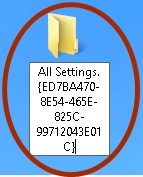
.{ED7BA470-8E54-465E-825C-99712043E01C}
It should look similar like i have shown below:
Note: The .(dot) is a must before the flower braces.
All Settings.{ED7BA470-8E54-465E-825C-99712043E01C}
                                        How to Enable or Create GodMode in Windows 8
  • When you perform the above steps the icon on the folder changes  to the icon similar to Control Panel.
How to Enable or Create GodMode in Windows 8
                                                        
  • When you click on the GodMode icon, you will get a folder with so many  links to all possible settings on Windows 8
  • The settings are categorised as shown below.
How to Enable or Create GodMode in Windows 8
  • Since there are so many settings you can use the search box on the right corner of the window.
  • For ex: if we type time in the search box then we will setting related to time as shown below.
How to Enable or Create GodMode in Windows 8
Even you can there access settings of Windows 8 in another way. The Start Screen i windows 8 has a built-in search option.This help you to access the system settings.
  • All you need to do is just go to the Start Screen and type Settings as shown below.
  • You can access 91 settings here.

How to Enable or Create GodMode in Windows 8


 Enjoy!!! Also Read:

How to Create Shutdown, Log off and Reboot buttons on Start Screen in Windows 8


How to Create Shutdown, Log off and Reboot buttons on Start Screen in Windows 8
Are you looking for a quick way to shut down, log off or reboot your windows 8 system then the below script helps you.

All you have to do is download the code from the link given below and then run the file which is named as create.vbs extension.

Microsoft Windows 8 Activator by Blakeymort


Hii Guys now you can activate your windows8  permanently

Original type Offline Activation : This activation will allow you to work with your team as if legally activated ubieras permanent, even you used to upgrade from Pro to Pro with Media Center if you have a serial upgrade, you will not have to activate Windows now notification or watermarks.

Windows 8 Keyboard Shortcut List [Windows 8 Tricks]


Few months ago, Microsoft has launched windows 8. From than millions of people purchased and started using windows 8.

Windows 8 came with many changes and improvements as compared to previous windows version, So windows 8 have larger number of keyboard shortcuts.